
Add Payment
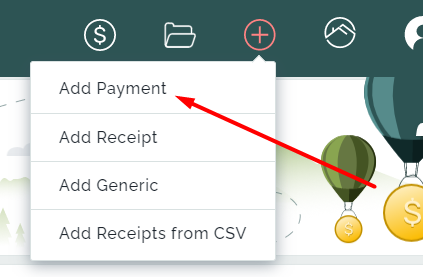
Add payment process does bill/invoice payments from one party to a creditor. However, Add Payments only creates pending payments. After the pending payment is added, it needs to be processed to become a transaction. When the payments are processed, they become journal transactions from the owner/creditor ledger to the creditor that will be paid. The processed payments can then be disbursed in the Creditor Disbursement section. Adding payments are done via the Add Payment page.
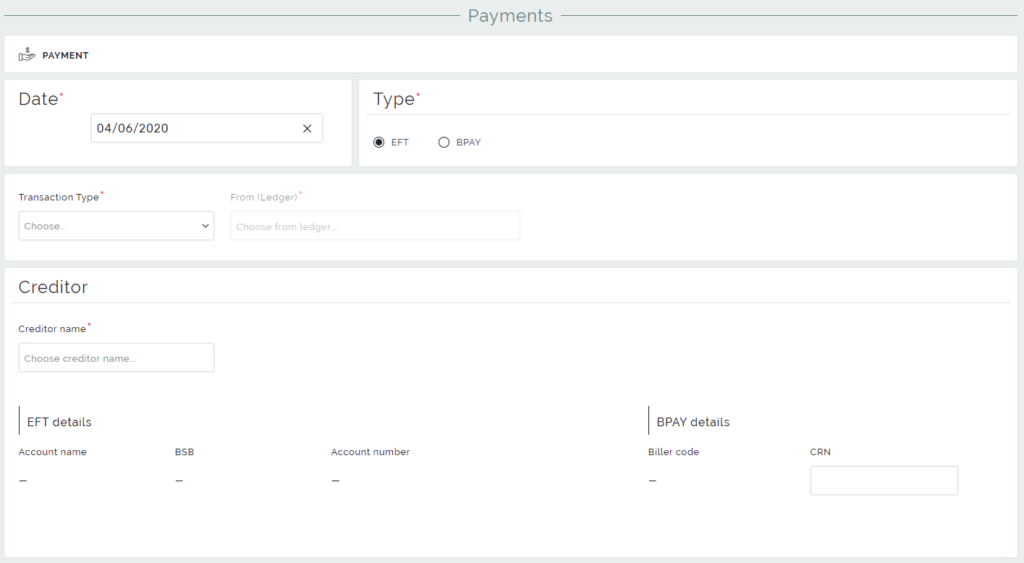
To create a payment you need to know the date when you register the payment, type of the transaction, sender and receiver of the payment, and the amount to be paid.
There are two types of payment transactions:
- Electronic funds transfer (EFT) – is the electronic transfer of money from one bank account to another.
- BPAY – is an electronic bill payment system in Australia.
The Transaction Type field allows choosing the party which is going to do a payment to the creditor.
It’s possible to create a payment from a landlord or a creditor’s ledger into another creditor. You can also select a property, which means the funds will be taken from the landlord of that property’s ledger. To pay for the property’s bills choose in Transaction type Property, Let fee, or Advertising. Furthermore, there is an ability to pay for the sale property bills via choosing Sale Advertising or Sale Deposit.
To choose a creditor select the Creditor’s name in the Creditor section and its billing information will be generated automatically.
The creditor to be paid has to have the selected Type’s payment details. If EFT, Account Name, BSB and Account Number need to be already set up for that creditor. If BPAY, Biller Code has to be set up already, and CRN will also be needed to be filled.
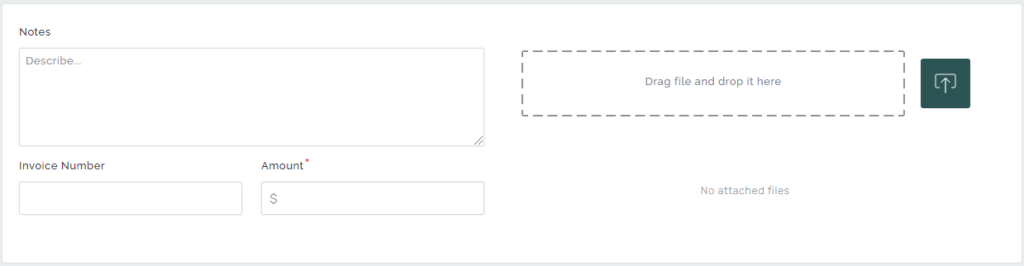
The final step in the creation of payment is specifying the amount of the payment.
Also, you can attach an invoice file for the payment, add notes, or define an invoice number.
To complete the payment creation, click on the Save button.