
Roles and Permissions
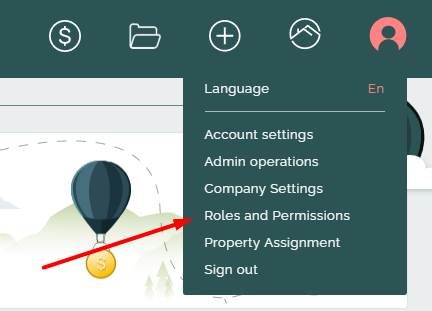
Roles and Permissions page is a highly important feature that can provide the user with specific rules for accessing system functionalities.
Here, a user that has access to this page can create roles for the company, modify permissions for roles, and assign roles for users of the company.
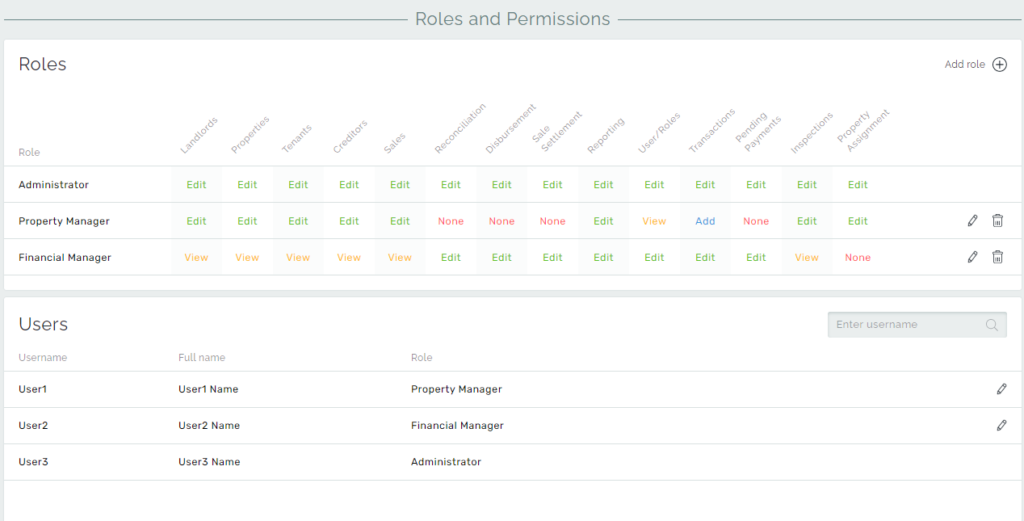
The first and most important role is the Administrator. This role is assigned automatically to the first user of the company. The Administrator has access to all rights and functions, and this role cannot be changed or deleted. Moreover, the Administrator has the right to switch users between roles. Each role can be assigned to any number of users, including the Administrator role.
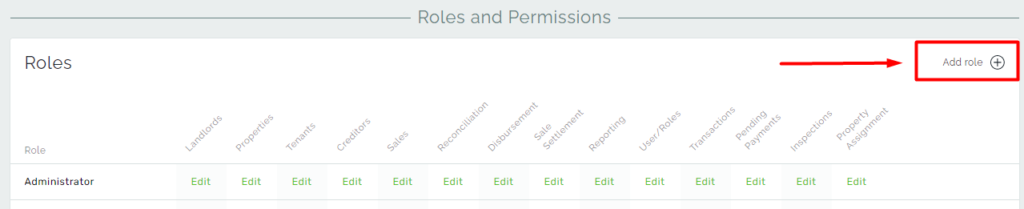
New roles can be added via Add role in the top right corner of the page.
Types of Permissions
During the role’s creation or editing, you need to identify and assign the permissions for each item on the Roles and Permissions page.
Types of Permissions:
- Edit – The privilege that allows making any changes with the objects. Role with Edit permissions has full access to all functionality in its corresponding section. Permissions are in hierarchical order, so Edit includes all permissions below.
- Add – This privilege allows adding new objects into the system, for example, entities, transactions, or adjustments. With this privilege, users aren’t allowed to make changes on the pages but this one includes View privileges as well.
- View – This privilege is to only view data from the pages. This privilege prohibits modifying any data in its respective section.
- None – No access for the respective section.
The new role created has default permissions as Edit. Then the user can specify which permissions to assign.
In our system, for entity items, such as Landlords, Tenants, Creditors, Properties, and Sales, we have a full range of permissions. The role can have a combination of permissions for entities and according to them, the user can interact with our system.
Disbursement and Sale Settlement has None or Edit permission variations. The choice is only between if the user is allowed to do the disbursement or settlement processes, or not. Also as a side note, Monthly Close permission is included in the Disbursement section.
Transactions and Pending Payments have a full range of permissions for the role, and with the selected type of permission you can get access to:
Transactions: Transactions page + Add Receipts + Add Generic
Payments: Payments page + Add Payments
Reconciliation, Reporting, Inspections, and Property assignments sections items have multiple choice of permissions from None to Edit and allow access to the respective sections.
User/Roles – This permission determines the ability for this role to make changes for other roles, create new ones or reassign users’ roles. This is basically a permission to access this Roles and Permissions page.